Korean Keyboard Layout
Since the last article talking about the IPA, it is time to target a specific language. Wikipedia is a good resource of phonology chart, like you could find IPA for Korean and Korean Phonology article, which would give you a brief of what this language’s phonetic structure is. Once you could pronounce then you would gradually learn it.
Another thing is typing alphabet out on the computer. Korean has different keyboard kayout. Like the traditional Set-2 and Set-3 layout. They are drafted when the PC was getting more wide spread. Basically they are different ways of mapping Han-gul charaters onto the keyboard buttons. If you are going to adopt them, you have to memorize the keyboard layout without pegging into any of your previous experience. I would suggest to use another keyboard layout: HNC Romaja, Which puts the Han-gul into corresponding roman alphabet button, so when you hit ‘a’, it shows ‘ㅏ’. Much like you would type hiragana in Japanese.
You could set the keyboard layout in Mac’s Settings -> Keyboard -> Input Method -> Korean -> HNC Romaja
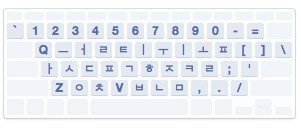
Here is a few examples with han-gul and its typing sequence.
안 녕 하 세 요 xan niex ha sei xyo
안 녕 히 계 세 요 xan niex hi gyei sei xyo
감 사 합 니 다 gam sa ham ni da
And internet slang
ㅋ ㅋ ㅋ k k k
IPA Keyboard on Mac OS X
While back in school, we most probably are taught American English with the so called Kenyon and Knott Phonetic Symbol. It is a simplified IPA subset to capture the normal American pronunciation. And if you were taught with British system, then Daniel Jones Phonetic Symbol would be used instead. However, none of these are useful when you expand your eye sight to other languages. Especially when the language you are learning is in a different language family, say you are native in Romance family but learning Sino-Tibetan languages family, or vice versa. You need a phonemic transcription accurately reflect the actual sound. No matter it is tone or aspirated consonant or not.
International Phonetic Alphabet is the de factor standard we use. You could find various IPA courses on youtube. Like 1, 2, 3. You could get a whole picture from watching the video, but you still have to learn it with your ear and muscle.
Besides keep practicing, it is good to type it out when you hear a word. Unfortunately, the default Mac OS X system doesn’t come with an IPA keyboard. If you are a less frequent IPA user, you could use web keyboard, 1 and 2. But for frequent use, installing fonts and keyboard layout are good to have.
With this article as a very good reference: Using IPA fonts with Mac OS X. I installed it successfully on my Mac OS Yosemite.
- Download the keyboard layout from here:
- Double click the dmg and copy to your $HOME/Library
cp /Volumes/IPA-MACkbd/IPA\ Unicode\ 6.2\(v1.5\)\ MAC.keylayout $HOME/Library/Keyboard\ Layout/
- Download the CharisSIL fonts for IPA
- Copy the fonts to your Libar
cp CharisSIL-5.000/ $HOME/Library/Fonts/
- Launch Settings -> Keyboard -> ‘+’ -> Others, to choose the ‘IPA Unicode 6.2’.
- Ctrl + Command + Space to switch to IPA input method And enjoy!